The flagship · $1,299 lifetime
NinjaTrader trade copier for prop firm accounts
In short: DC Copier is a NinjaTrader 8 AddOn that mirrors your own orders from one account to as many followers as you run. Eleven and a half thousand lines of code, most of them about what happens when something goes wrong. It was written for a trader running Apex evaluations and funded accounts alongside sim, and it is built around one idea — a follower must never end up in a state the master is not in.
Key facts
| What it is | A NinjaTrader 8 AddOn — its own window from Control Center › New |
|---|---|
| Platform | NinjaTrader 8 Desktop, .NET Framework 4.8 |
| Follower accounts | No cap in the code. 20+ is normal use |
| Order types copied | Market, Limit, Stop Market, Stop Limit, MIT — plus OCO, recreated per follower |
| Sizing | Multiplier or fixed quantity, set per follower |
| Instrument mapping | Micro to mini and back — MNQ↔NQ, MES↔ES |
| Order Flow+ required | No |
| Tick Replay required | No |
| Remote control | Telegram, including flat-everything |
| Machines per licence | 3 |
| Price | $1,299 lifetime — one payment, updates included |
Why followers go out of sync — and why they cannot here
This is the part every other copier page skips, so here is the whole story, including the bug we shipped and had to fix.
The failure
A master was short MNQ and closed the position. The followers closed — and then opened a long.
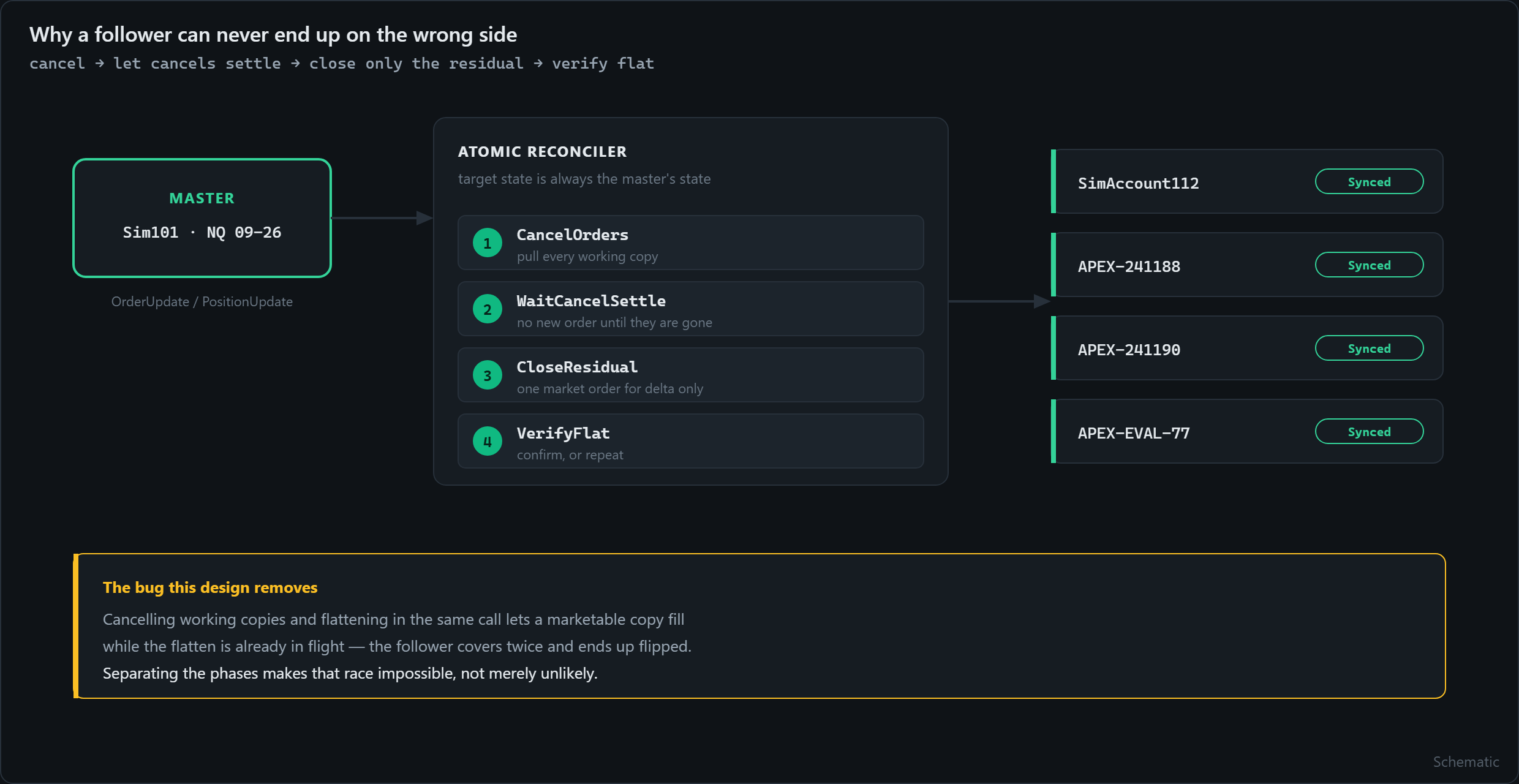
The logs showed why. The old safety-flat routine cancelled the working copies and called Flatten() in the same dispatcher call. Both are asynchronous in NinjaTrader. A marketable copy filled inside the cancel window, in parallel with the flatten — the account covered twice and ended up flipped.
Prop firm latency made it worse: order acknowledgements were taking 760 to 1,243 milliseconds while the safety threshold was set at 500.
The fix was not a longer timeout
The routine was replaced with a phased, atomic reconciler. The target state is always the master’s state, and because no closing order is sent until the cancels have settled, the race that produced the flip cannot occur.
Pull every working copy for that instrument.
Send nothing new until those cancels are confirmed gone.
Compute delta = target − live and close exactly that, with one market order.
Confirm the result. If it is not right, repeat.
Thresholds: master-flat lag 1,500 ms, wrong-side 500 ms. The manual Flat Followers button runs the same reconciler — there is no second, less careful code path hiding behind a button.
What watches the safety features
Most copiers have a flatten button. Very few check whether the flatten actually worked. Two of these are guarded — something verifies the safety operation itself completed, and acts if it did not.
PANIC GUARDED
Emergency Flat All cancels and flattens every enabled account. A guardian then confirms it finished. The panic button is not fire-and-forget.
Hard-lock GUARDED
Once an account is locked out it stays out until you deliberately release it, and a guardian enforces that the lock is holding.
Master risk limits
Daily loss and profit limits apply to the master too. A bad day does not get to propagate itself across every account you run.
Trailing drawdown
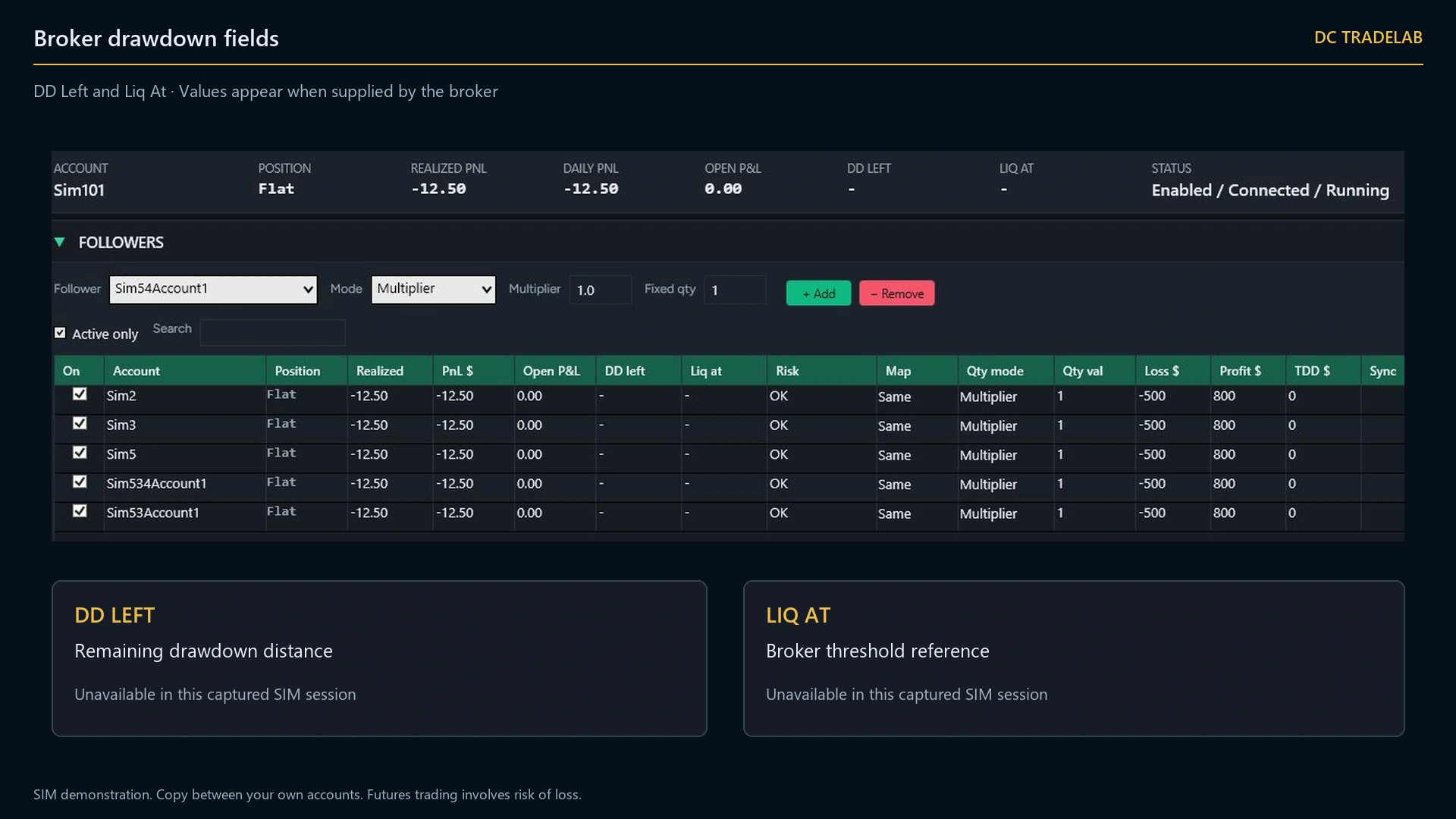
Tracked per account, because that is how the firms calculate it. A follower that joined late has a different high-water mark from the master.
Continuous mismatch check
Positions are compared on a loop, not only after an order event, so drift is caught even when nothing is happening.
Connection resilience
Defined behaviour when a connection drops, not improvisation. Nothing is silently retried into a stale market.
News and schedule guards
Do not copy into an event window, or outside your session. Set once, enforced every day.
Max quantity guard
A ceiling no copied order can exceed, whatever the master does. A fat finger upstream stays upstream.
Flatten one account
Close a single follower without touching the rest — for when one prop account needs to stop and the others do not.
Every account is Synced or MISMATCH, visibly
The account grid carries a sync traffic light. Synced means the follower’s position matches what the master’s position implies for it. MISMATCH means it does not — and the row is highlighted, the header count changes, and the event log records the reason the moment it happens.
Both states carry a symbol as well as a colour, deliberately. Around 8% of men have red-green colour vision deficiency, and this is not a place to make somebody guess.
Positions are colour-coded long and short, numbers are monospaced so columns line up, and the event log is coloured by severity: reconcile, panic, mismatch and rejection lines stand out while routine chatter stays quiet. The log exports to CSV.
Run several copiers at once
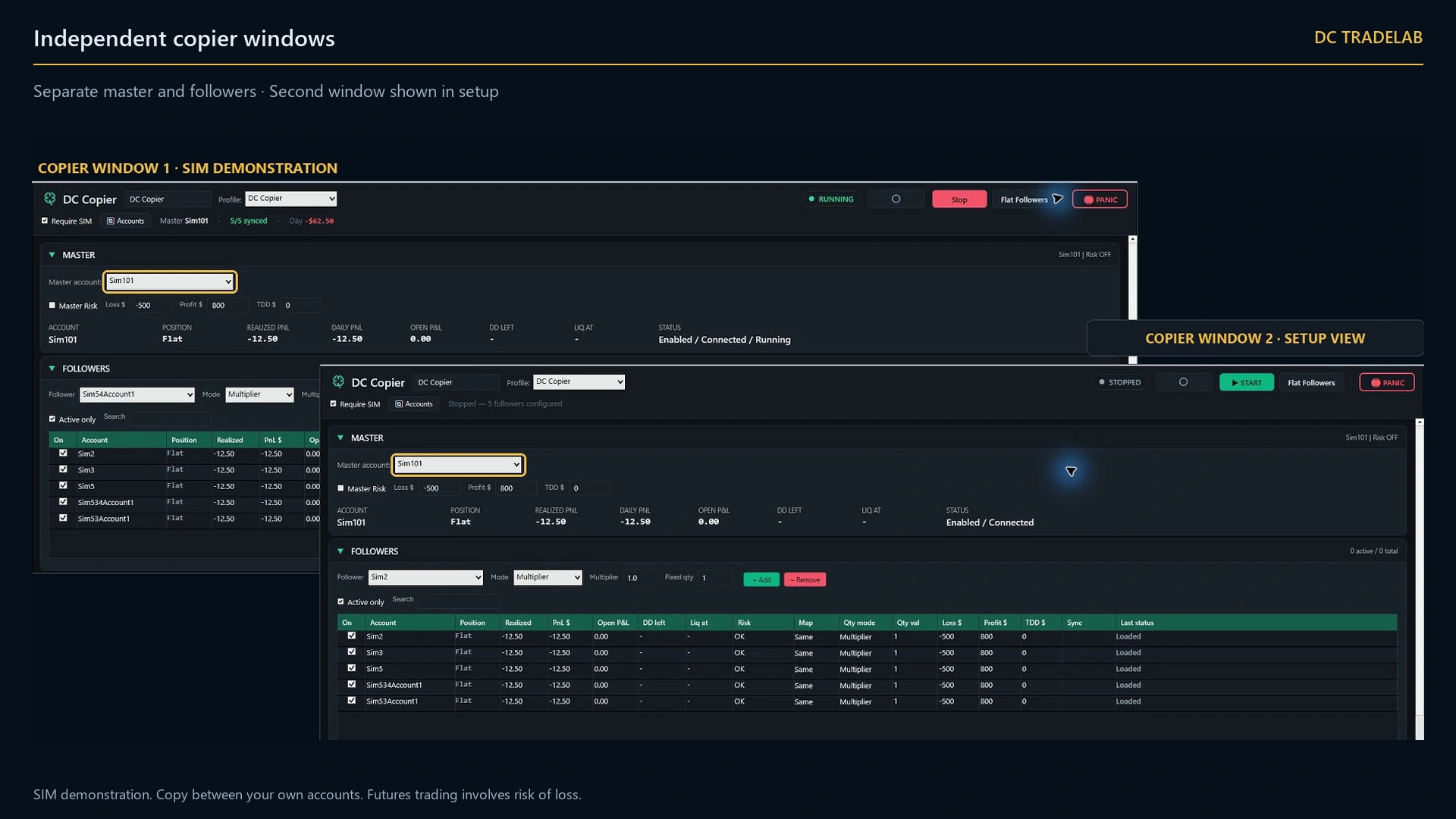
Open as many copier windows as you need. Each is named automatically, each has its own master, its own followers and its own risk settings, and every one of them is saved and restored with your NinjaTrader workspace.
One per prop firm
Apex accounts in one window, Tradeify in another, each with the drawdown rules that firm actually uses.
One per instrument
An NQ master driving NQ followers, an ES master driving ES followers, with different sizing on each.
One per strategy
Scalps copied to the aggressive accounts, slower trades copied to the conservative ones, from the same platform.
No competitor page mentions this, which is why it is stated here as a feature rather than left as a footnote.
Every order type, mapped
| Master action | What happens on each follower |
|---|---|
| Market, Limit, Stop Market, Stop Limit, MIT | The equivalent order, sized by that follower’s rule |
| Price or quantity change | The mapped follower orders are changed to match |
| Cancel | The mapped follower orders are cancelled |
| OCO bracket | The OCO relationship is recreated per follower, never shared across accounts — so one account’s stop can never cancel another account’s target |
| Partial fill | Copies track the filled quantity, not the submitted quantity |
Copied orders carry a DC_ prefix, so the copier can never mistake its own activity for a new master order and copy it again.
Micro to mini, and back
A follower on a small evaluation account does not have to trade the same contract as the master. MNQ↔NQ and MES↔ES mapping lets a full-size master drive micro followers, or the reverse, with the multiplier applied on top.
How many accounts can it actually handle?
Twenty-seven followers, tested. One master driving 27 follower accounts at once, run by the developer on his own accounts, everything staying in sync. That is a number we have actually reached, not an estimate.
Above that we simply have not tried, so we will not claim it. There is no maximum-follower constant anywhere in the code, so the limit is not ours — what limits you is how many broker connections NinjaTrader can hold at once.
NinjaTrader Desktop supports one active Rithmic connection at a time, but multiple Tradovate connections simultaneously. Apex, Tradeify, MyFundedFutures and BluSky use Tradovate, so those can all be connected at the same time. If your firms are on Rithmic you cannot hold two Rithmic sessions in one NinjaTrader, and you need a second machine or a different route. Firms change providers — check yours rather than trusting this paragraph a year from now.
Most serious multi-account prop traders host NinjaTrader on a Windows VPS in a Chicago-area datacentre, close to the CME matching engines. Not because it is glamorous, but because latency becomes consistent: every follower gets a similar fill instead of one lagging.
What happens if my internet drops?
The copier stops receiving master updates and the disconnect guard takes over according to your configuration. Nothing is silently retried into a stale market. When the connection returns, the reconciler compares each follower against the master’s current state and closes the gap — it does not replay the orders you missed.
That distinction matters. Replaying missed orders into a market that has moved is how a recovery becomes a second incident.
Getting set up
Have every account you want to copy already connected in NinjaTrader.
Import the AddOn, compile, restart NinjaTrader.
Open Control Center › New › DC Copier. Pick the master, add followers, set each one’s multiplier or fixed quantity.
Run Validate, then Preview Test — it simulates a copy without sending anything. When the log looks right, press START.
Your profile — accounts, sizing, guards, theme — is saved automatically and reloaded next time.
Price
$1,299, one payment. There is no monthly plan and nothing to renew. Three machines per licence, so your desktop and your VPS are both covered.
For comparison: NinjaTrader’s own Multiple Broker add-on costs $99 every month, for as long as you use it — and it is a connection product, not a copier. It lets you connect more brokers; it does not mirror a single order across twenty accounts, and it has no reconciler, no PANIC and no per-account drawdown tracking. DC Copier is one payment of $1,299 and does considerably more: a phased reconciler, per-account risk guards and a supervised emergency flatten. Fourteen months of the add-on costs more than owning this outright, and the add-on still is not a copier.
Checkout is not open yet — the licensing client and the payment provider are still being built. The founding list locks a lower price until then.
Frequently asked questions
Do prop firms allow trade copiers?
Copying between your own accounts is generally permitted by the major futures prop firms. Copying for someone else is a different, regulated activity and is not what this tool is for. Rules change without notice, so check your own firm’s current terms rather than relying on any vendor’s summary — including this one.
Does it work with Apex, Topstep, Lucid and Tradeify?
It works with any account NinjaTrader can connect to, which includes prop accounts on Tradovate and Rithmic. DC TradeLab is not affiliated with any of those firms and names them only as compatibility facts.
Will it copy my ATM stop and target?
Yes. Bracket orders are copied and the OCO relationship is recreated on each follower separately, so one follower’s stop can never cancel another follower’s target.
What if one follower rejects an order?
That account is flagged MISMATCH, the reason is written to the event log, and the reconciler brings it back to the master’s target state. The other followers are unaffected and keep running.
Can I control it from my phone?
Yes, through Telegram — including flattening everything. If the desk is not where you are when something goes wrong, the button still works.
Do I need a VPS?
No, but most serious prop traders use one. A Windows VPS near the CME matching engines in Chicago makes latency consistent across every account at once, which matters more than raw speed.
Is my licence tied to one PC?
Three machines per licence, with self-service reset from the customer portal when it opens.
Can I buy it today?
Not yet. The licensing client inside the AddOn and the payment provider are both still being built. Joining the founding list locks a lower price and takes no payment.
One decision, on every account
You take the trade once. The copier takes it everywhere else.
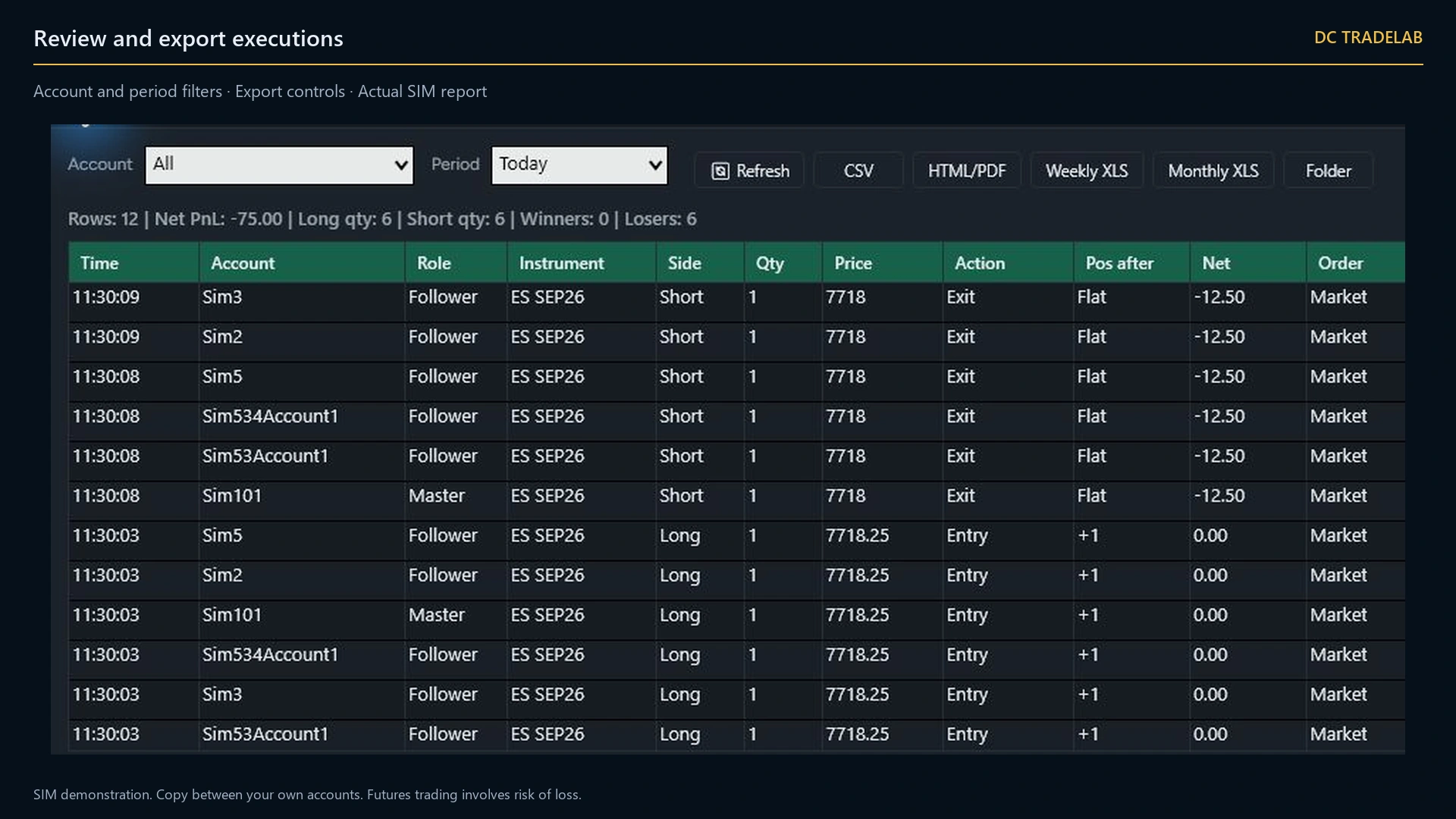
Close on the master and the followers are brought flat in a checked sequence — cancel the working orders, wait for the cancels to settle, close what is left, verify flat. That order is the product, and the event log shows you each step as it happens.
Lock the founder price
The copier lifetime alone is planned at $1,299. The founding bundle — copier, ten indicators and the Telegram agent, all lifetime — is $1,845 for the first fifty. No payment taken today.